
Table of Contents
- What Testing Your Mobility Equipment Actually Means
- What You’ll Need Before You Start
- How to Adjust Rollator Brakes and Test Brake Function
- Mobility Scooter Battery Testing Guide: Checking Power and Health
- Wheelchair Safety Inspection Checklist: Frame to Wheels
- Stability and Load Testing: Ensuring Your Equipment Handles Daily Use
- Common Mistakes to Avoid When Testing Mobility Equipment
- When to Stop Testing and Call a Professional
- Frequently Asked Questions
Last Updated: September 20, 2026
What Testing Your Mobility Equipment Actually Means
To test mobility equipment means checking that it works safely and reliably before you depend on it daily. It’s about catching problems early to avoid falls, injuries, or equipment failure.
Regular hands-on checks prevent degradation: brakes wear, batteries lose capacity, wheels develop flat spots, and frames crack. Most problems are preventable with basic testing.
The goal is to verify your rollator, wheelchair, or scooter performs safely. You’re checking for safety hazards and mechanical failures, like checking your car before a long drive.
This guide covers the testing methods you can do at home, when to call a professional, and how to spot red flags that mean your equipment needs repair now.
What You’ll Need Before You Start
Basic Tools:
- Flashlight or headlamp for inspecting dark areas
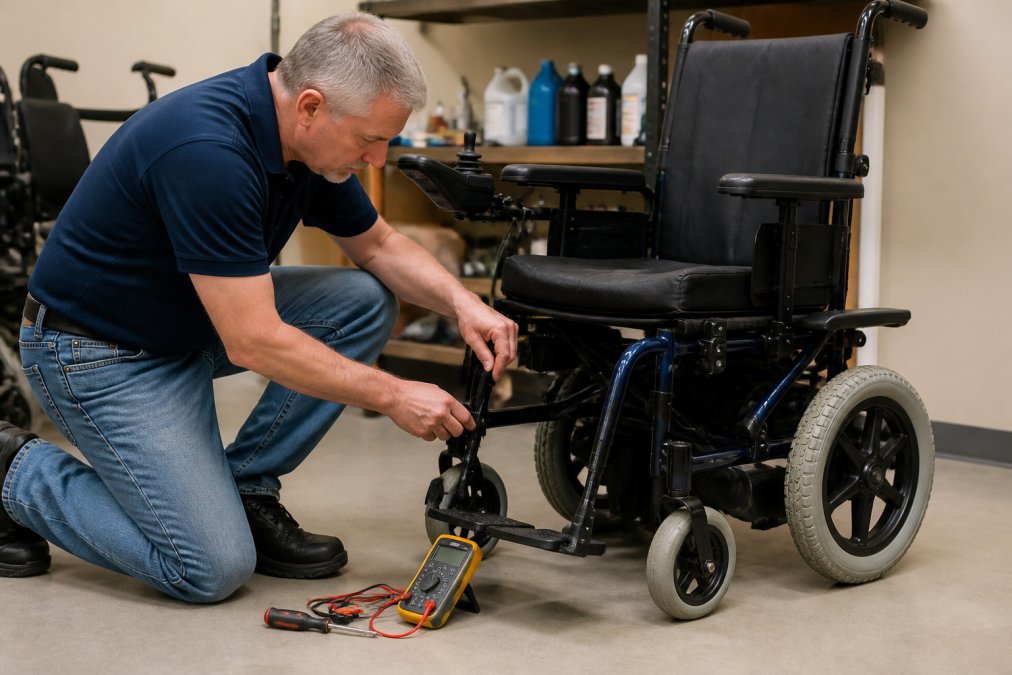
- Multimeter (digital voltmeter) for battery testing, available at hardware stores for under $20
- Tape measure for checking doorway clearance and turning radius
- Notebook and pen to record findings
Safety Items:
- Clear floor space at least 10 feet long for stability testing
- Another person to spot you during dynamic testing
- Comfortable, supportive shoes
Optional but Helpful:
- Tire pressure gauge for scooter and wheelchair tires
- Wrench set for brake adjustments
- Cleaning cloth for inspecting wheels and frames
A flashlight and multimeter handle most testing needs.
How to Adjust Rollator Brakes and Test Brake Function
Rollator brakes are your first line of defense against falls and wear out faster from constant use. Testing brake function is the most important safety check.
Static Brake Test (Do This First)
Set the rollator on a flat surface and push down on the brake handles firmly. The rollator should not move. If it rolls even slightly, the brakes need adjustment. Listen for a clicking sound, some rollators click, others lock silently. Either is fine; what matters is that the wheels stop.
Dynamic Brake Test (Do This on a Gentle Slope)
Find a gentle slope. Walk with the rollator and apply brakes gently, the rollator should stop smoothly within 3-4 feet. Then test hard braking at normal speed: you should stop within 6-8 feet without sliding. If you slide, brake pads are worn and need replacement.
Brake Adjustment Steps
Most rollators have cable-operated brakes. Locate the brake cable adjuster on the frame near the wheel. Loosen the locknut, turn the adjuster clockwise to tighten the brake, test with your hand, and repeat until the wheel resists firmly. Tighten the locknut to lock the adjustment. If the brake cable is frayed or damaged, replace it, damaged cables can snap under load.

Test brakes on both sides of the rollator. One brake can wear faster than the other depending on how you walk. Uneven braking causes the rollator to pull to one side.
Mobility Scooter Battery Testing Guide: Checking Power and Health
Your scooter’s battery is its heart. Testing battery health regularly prevents unexpected power loss and extends battery life.
Visual Battery Inspection
Look at the battery terminals where cables connect, they should be clean and bright. Green or white corrosion means the battery is leaking; clean it with a cloth dampened in white vinegar, then dry thoroughly. Check the battery case for cracks, bulging, or leaking fluid. A cracked or bulging battery needs immediate replacement.
Voltage Testing with a Multimeter
Set your multimeter to DC voltage. Touch the red probe to the positive terminal (+) and the black probe to the negative terminal (−). A healthy battery reads 24V, 36V, or 48V depending on your model (check your manual). A fully charged battery should read within 10% of rated voltage. If voltage reads more than 10% below rated voltage, the battery is failing and needs replacement.
Load Testing
Charge the battery fully overnight. Drive the scooter at normal speed on flat ground for 30 minutes and note the remaining charge. A healthy battery should power your scooter for at least 50% of its rated range. If you travel only 25% of the rated distance, the battery is degraded.
Charging Routine
Charge the battery after every use. Avoid letting it fully drain before charging, as this stresses the cells. Unplug the charger once the battery reaches full charge to prevent overcharging.
Never attempt to repair a battery yourself. Scooter batteries contain hazardous materials and can cause electrical burns or explosions if disassembled. If testing shows the battery is failing, contact Med-Tech Inc for professional replacement.
Wheelchair Safety Inspection Checklist: Frame to Wheels
Wheelchairs take constant stress. Regular inspection catches frame cracks, weld failures, and wheel damage before they cause injury.
Frame Inspection
Examine the frame for visible cracks or bends. Run your hand along tubes and joints for sharp edges, rough welds, or chipped paint. Check all bolts and fasteners, tighten any loose ones, as loose fasteners can cause frame collapse. Inspect the seat sling or cushion for tears, thin spots, or fabric separation.
Wheel and Tire Inspection
Spin each wheel by hand, it should rotate smoothly without wobbling. Check tire pressure (most wheelchairs use 50-65 PSI; check your manual). Look at tire tread; if you can see the cords, replace the tire immediately.
Brake Inspection
Test both brakes with the wheelchair on a slight slope. Apply the brakes. The wheelchair should not roll. If it rolls even slightly, the brakes need adjustment or replacement.
Check the brake handles for cracks or loose connections. A cracked handle can break under pressure.
Armrest and Footrest Check
Armrests should be secure and not wobble. Loose armrests can cause falls during transfer.
Footrests should support your feet without pressure points. Adjust the height so your knees are slightly bent when your feet rest on the footrest. Feet that dangle or press hard on the footrest cause circulation problems and pain.
| Component | What to Check | Red Flag |
|---|---|---|
| Frame | Cracks, bent tubes, loose bolts | Any visible damage or movement |
| Wheels | Smooth rotation, no wobble | Wobbling or catching during spin |
| Tires | Proper pressure, visible tread | Bald spots or visible cords |
| Brakes | Hold on slope, secure handles | Rolls when braked or loose handles |
| Seat | No tears, secure attachment | Fabric separation or thin spots |
| Armrests | Secure, no wobble | Movement or cracks |
Stability and Load Testing: Ensuring Your Equipment Handles Daily Use
Stability testing verifies that your equipment won’t tip or collapse during normal use. Load testing ensures it can support your weight safely.
Static Weight Test
Place the equipment on a flat, hard floor. Apply your full weight gradually. The equipment should not shift, creak excessively, or flex noticeably.
For rollators: Lean forward and backward. The rollator should remain stable. If it tips easily or feels unstable, the wheels may be misaligned or the frame may be bent.
For scooters: Sit normally. The scooter should not tilt to one side. If it tilts, the frame may be bent or the wheels need alignment.
For wheelchairs: Shift your weight side to side. The wheelchair should remain stable. Tipping during weight shifts indicates a bent frame or misaligned wheels.
Dynamic Stability Test
This test requires another person to spot you for safety. Perform these movements slowly and deliberately.
Walk with your rollator at normal speed, then make a sharp turn. The rollator should turn smoothly without tipping. If it feels unstable during turns, the wheels may be too close together or the frame may be bent.
Drive your scooter at normal speed, then make a gradual turn. The scooter should lean slightly into the turn but not tip. Sharp turns at speed can cause tipping, always turn gradually.
Propel your wheelchair forward, then make a sharp turn.
Braking Distance Test
Equipment that feels unstable or has increased braking distance is a safety hazard. Stop using it and have it inspected by a professional before continuing.
Common Mistakes to Avoid When Testing Mobility Equipment
Most people skip the need to test mobility equipment because they think it’s complicated or unnecessary. It’s not. But there are common mistakes that make testing ineffective.
Mistake 1: Testing on Carpeted Floors
Mistake 2: Not Testing Under Real Conditions
Mistake 3: Ignoring Minor Problems
Mistake 4: Testing Alone
Mistake 5: Not Documenting Results
Mistake 6: Adjusting Things You Don’t Understand
When to Stop Testing and Call a Professional
Some problems require professional service. Knowing when to stop testing and call for help is critical.
Call a Professional If:
Frequently Asked Questions
How often should I test my mobility equipment?
Test your equipment monthly or before any extended use. If you notice unusual sounds, instability, or reduced responsiveness, test immediately. After repairs or adjustments, perform a full inspection before relying on the equipment. Regular testing catches small problems before they become safety issues.
What’s the difference between DIY testing and a professional mobility assessment?
DIY testing checks basic function and safety at home using simple tools. A professional clinical evaluation assesses how well the equipment matches your functional ability, gait analysis, and transfer skills. Professionals use specialized equipment and can verify medical necessity for insurance coverage. Use DIY testing for routine maintenance; schedule professional assessment when equipment is new or after significant health changes.
Can I test my mobility scooter battery with a multimeter?
Yes. Set your multimeter to DC voltage mode and touch the red probe to the positive terminal and black probe to the negative terminal. Compare the reading to your battery’s rated voltage (typically 24V or 48V). A significant drop below the rated voltage indicates battery health problems. If voltage is consistently low, the battery may need replacement or professional charging assessment.
What should I do if my equipment fails a safety test?
Stop using it immediately to prevent injury. Document what failed during your test. Contact a professional technician or your equipment supplier for repair or replacement. Do not attempt to fix electrical, brake, or structural issues yourself unless you have technical training. Many issues require professional troubleshooting and proper calibration to restore safe operation.
Testing your mobility equipment regularly keeps you safe and extends equipment life. Start with the basics: brake function, battery health, and frame stability. Document your findings. Address problems early. And when you’re unsure, ask a professional. Your safety depends on equipment that works reliably every single time you use it.